Media Library
The media library (Library) centrally manages the images and files used by the module. Items can pick files directly from the library, avoiding duplicate uploads.
Click Library in the left navigation of the management area; the page title reads Media Library.
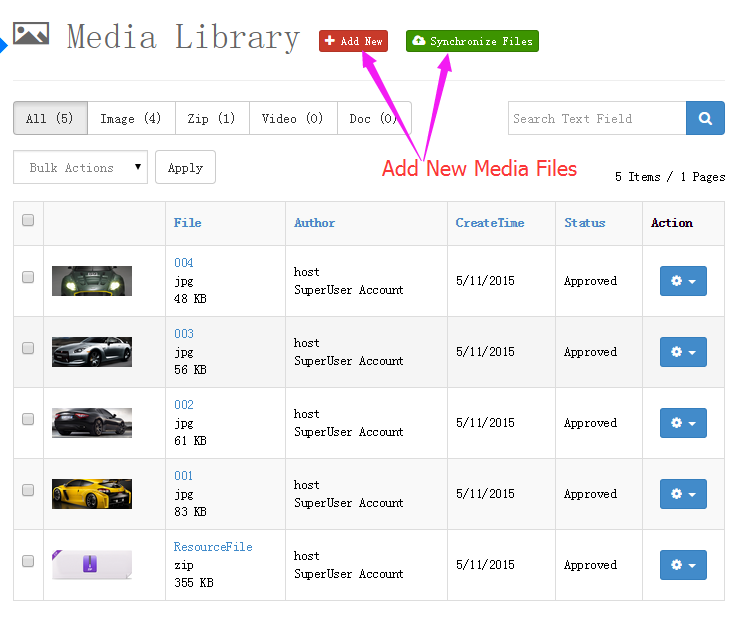
Page Overview
Type filter tabs
Tabs above the list filter by file type (counts in parentheses):
| Tab | Description |
|---|---|
| All | All files |
| Image | Images |
| Zip | Archives |
| Video | Videos |
| Doc | Documents |
A search box on the right filters by file name and other keywords.
File table
Each row shows one file:
| Column | Description |
|---|---|
| Checkbox | Select files for bulk delete |
| Thumbnail | Image preview (about 80×80) |
| File | File name (click to open the original in a new window), with extension and size below |
| Author | Uploader |
| CreateTime | Upload time |
| Status | Status (Approved) |
| Action | Remove deletes the file permanently (with confirmation — no recycle bin for media) |
Select multiple files and use Bulk Actions → Delete → Apply to remove them in bulk.
Uploading Files
Click the Add New button in the top-right corner to open the upload dialog, pick local files and upload. Close the dialog when done and the list refreshes automatically.
Storage location
Uploaded files are stored under Portals/[PortalId]/DNNGalleryPro/uploads/Year/Month/Day/, grouped by upload date; duplicate file names get a numeric suffix (e.g. photo_1.jpg).
Synchronizing Site Folders
Click the Synchronize Files button in the top-right corner to open the sync feature.
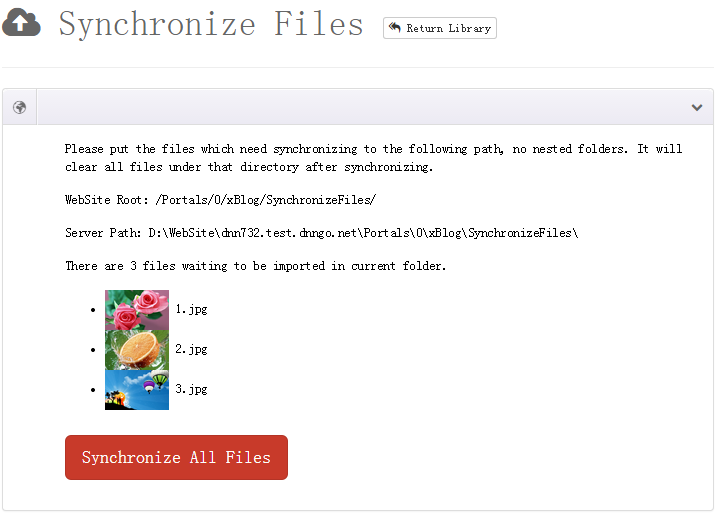
Syncing registers files that exist in the upload folder but not yet in the library. Great for:
- images uploaded in bulk via FTP;
- resources migrated from other modules or older versions;
- existing site files you want to manage centrally.
Using the Library in Items
When adding an item, choose the Files source on image fields to browse the library and pick a file — or upload a new one right there.
TIP
The media library is shared per portal: every DNNGalleryPro instance in the same portal uses one library — upload once, reference everywhere.
Next Steps
- Adding Items — use the library in the item form
- All Items — manage items