
How to Use the WebP Image Format in the Obvio Theme
What is the WebP image format?
WebP is an image file format which contains image data with both lossless and lossy compression. Developed by Google, WebP is basically a derivative of the WebM video format. The format is capable of reducing image file size up to 34% smaller than JPEG and PNG images while retaining high quality.
Steps to Use WebP in the Obvio Theme
You can enable WebP in DNN using one of the methods below.
Method 1: Edit web.config
- Enter the root directory of the site via FTP software
- Back up the
web.configfile - Edit the
web.configfile to add the following codes in<staticContent> </staticContent>:
xml
<remove fileExtension=".webp" />
<mimeMap fileExtension=".webp" mimeType="image/webp" />- Refresh the site. If the site reports an error, restore the
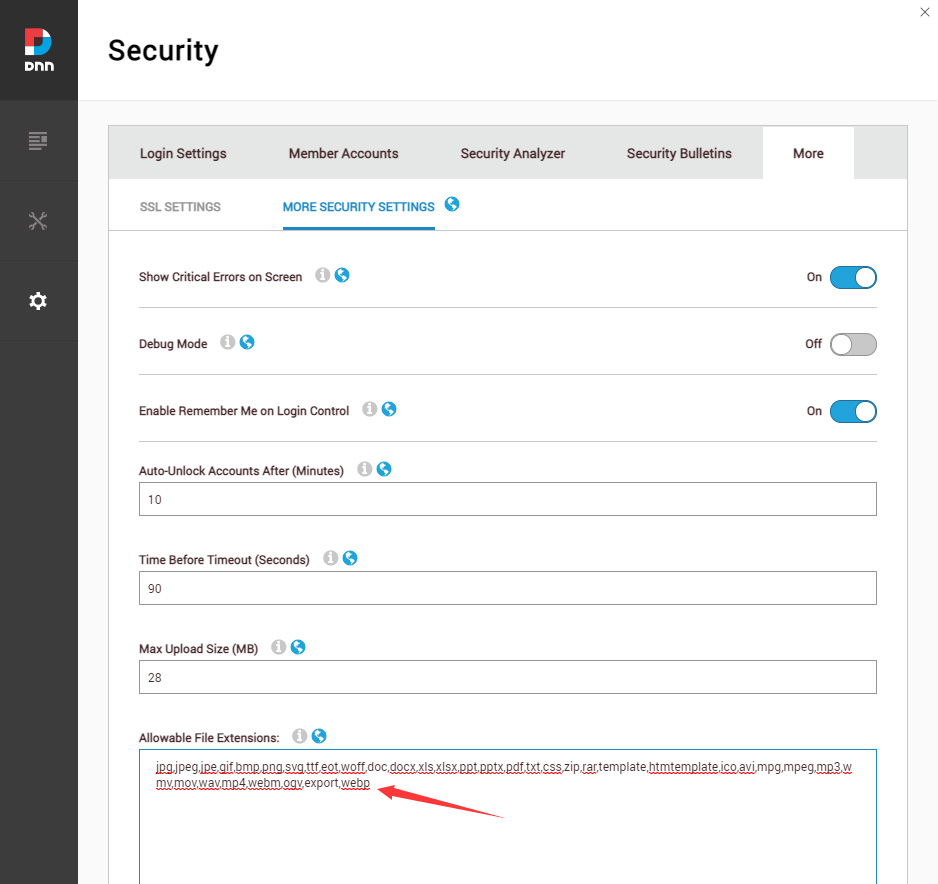
web.configfile using the backup from step 2 - Log in to the site as the super user, go to Settings > Security, then add WebP in Allowable File Extensions
Method 2: IIS Manager
- Open IIS Manager and navigate to the website you want to manage
- In Features View, double-click MIME Types
- In the Actions pane, click Add
- In the Add MIME Type dialog box, type webp in the File name extension text box
- Type image/webp in the MIME type text box
- Log in to the site as the super user, go to Settings > Security, then add WebP in Allowable File Extensions
Convert JPG/PNG to WebP
You can convert JPG/PNG images to WebP via CloudConvert.
Finally, you can upload and use the WebP images in the theme just like other image formats.