General Settings
General Settings consist of seven panels: basic options, Google Map, Article Detail, Author, Avatars, RSS Feeds and Sitemap.
Basic Options
| Field | Description |
|---|---|
| Articles per page | Number of articles shown per page on blog list pages |
| Enable Publish Time | Whether articles are displayed according to their scheduled publish time |
| Article list sorting | Default list order: publish time DESC / ASC, title A-Z / Z-A |
| Enable Ping Service | Automatically notify update services when a new post is published |
| Ping Service | Update service URLs, one per line (Google Blog Search included by default) |
| Media Upload Extensions | File extensions allowed in the media library, comma-separated; leave empty for the default list |
| Searchable | Whether articles are indexed by the DNN search engine |
| Searchable Count | Upper limit of articles participating in search |
| Search Text | Search scope of the xBlog built-in search: Title (always on), Summary, Content Text, Tags |
Upload safety
Do not add web markup types such as svg or html to Media Upload Extensions — doing so can expose the site to stored XSS attacks.
Google Map Settings
- API Key — the Google Map API key, used by the map control on the article editor and related map features.
Article Detail Settings
Controls which module renders the article detail page:
| Option | Description |
|---|---|
| Main Module | The main module displays the detail page itself (default) |
| Article Detail Module | The standalone DNNGo.xBlog.ArticleDetails module renders the detail page — install it first and relate it to the main module |
Once configured, Article Detail Module Path shows the detail module's page path with a direct link.
When to use the detail module
Choose Article Detail Module when you want different layouts for list and detail pages (e.g. list page with sidebar, detail page full-width), placing the detail module on a separate page.
Author Settings
- Author Roles — set the authors of the main module. The role must also be granted module edit permission in DNN.
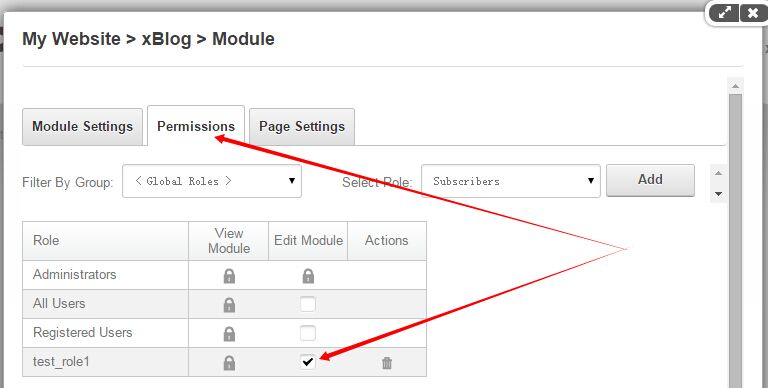
- Review new article — when enabled, articles submitted by authors require administrator review (Pending) before appearing
- Review reminder — send a review reminder email to module administrators when an author submits an article
- Management Module Roles — roles and users allowed into the xBlog administration interface
Multi-author collaboration
After setting a security role as an author role, its users can write articles in the xBlog administration interface; combined with the review feature, administrators control final publishing.
Avatars Settings
- Avatar Type — three sources:
- Gravatar — the gravatar.com service
- UserProfile (DNN) — the DNN user profile photo
- UserProfile & Gravatar — DNN photo first, Gravatar as fallback
- Avatar Maximum Rating — Gravatar content rating limit: G / PG / R / X
- Default Avatar — style for users without a custom avatar: mm (mystery man), identicon, monsterid, wavatar, retro
- Avatar Size — display size in px
Rss Feeds Settings
Controls the output of your own RSS feed:
| Field | Description |
|---|---|
| Synidication feeds display the latest | Number of latest articles in the feed (items) |
| Display excerpt | Output Summary or Full text |
| Fill Excerpt | When outputting a summary for an article without one, fill it from the content automatically |
| Display Read more | Show the Read more link in the feed |
| Display Picture | Show the featured image in the feed |
| Picture Link | Where the picture links to: Empty / Picture itself / Article URL |
| Rss Stylesheet / Rss Style xsl | Paths to custom feed stylesheets |
Sitemap Settings
| Field | Description |
|---|---|
| Synidication sitemap display the latest | Number of latest articles included (max 5000) |
| Sitemap Priority | Default page priority (0 ~ 1, default 0.5) |
| Sitemap Changefreq | Default change frequency: always / hourly / daily / weekly / monthly / yearly |
| Include Category URLs | Include category pages in the sitemap |
| Include in DNN Sitemap | Merge the module's pages into the DNN site sitemap |
The module's SiteMap URL is displayed at the bottom of the panel — add it to your robots.txt for search engines.
Each article can also set its own Sitemap Priority and Changefreq — see Add New Post → Sitemap Settings.