Skin Options
Skin Options control which elements are displayed in the current skin. Every skin has its own set of options — review this page after switching skins. The following uses the Classic skin as an example, organized in five panels.
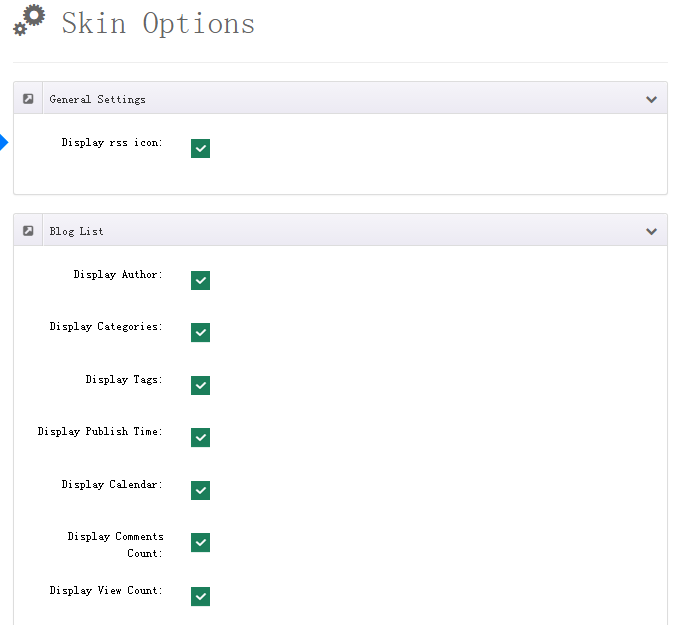
General Settings
| Field | Description |
|---|---|
| Display RSS icon | Show the RSS icon (on by default) |
| Accent Color | Theme accent color, picked with a color picker |
Blog List
Controls the elements of each entry on article list pages:
| Field | Description |
|---|---|
| Display Calendar | Show the date calendar badge (on by default) |
| Display Publish Time + Date Format | Show the publish time with a custom date format (e.g. dd MMM, yyyy) |
| Display Author | Show the author (on by default) |
| Display Tags | Show tags (on by default) |
| Display Categories | Show categories (on by default) |
| Display Comments Count | Show the comment count (on by default) |
| Display View Counts | Show the view count (on by default) |
| Description | Hidden / Display Summary (default) / Display Content Text |
| Summary Number + Format Summary | Shown when Summary is selected: characters to keep (default 500) and whether to preserve formatting |
| Display Read More + Read More Button Text | Show the read-more button and its label (default Read More) |
| Open In A New Window | Open articles in a new window (on by default) |
Blog Detail
Controls the elements of the article detail page:
| Field | Description |
|---|---|
| Display Calendar / Author / Tags / Categories / Comments Count / Publish Time | Same toggles as the list (all on by default) |
| Display Sharing Tool | Show the social sharing buttons (on by default) |
| Display Return Icon | Show the back-to-list icon (on by default) |
| Display Author Avatar | Show the author avatar (on by default) |
| Display View Counts | Show the view count (off by default) |
| Display Source URL | Show the article source URL (on by default) — articles imported via RssFeed Source link back to the original |
Related Articles
Controls the related articles area at the end of the detail page:
| Field | Description |
|---|---|
| Enable | Enable the related articles area (on by default) |
| Enable Related Articles | Match related articles by tags/categories (on by default) |
| Enable Random Articles | Show random articles (off by default) |
| Related Number | Number of articles to show (default 9) |
| Displayed Date Range | All (default) / 3 months / 6 months / 1 year |
| Display Thumbnail / Title / Author / Comments / Summary | Elements per article (all on by default) |
| Summary Number + Format Summary | Summary characters (default 100) and formatting |
| Auto Play | Auto-scroll the list (off by default) |
| Items (responsive columns) | Items per row at each breakpoint: Desktop (<1199px) / DesktopSmall (<979px) / Tablet (<768px) / Mobile (<479px), default 3/3/1/1 |
| Slides To Scroll | One Page (default) / One Item |
| Read More Button Text | Button label |
Newsletters
Controls the confirmation item of the front-end subscription form:
| Field | Description |
|---|---|
| Confirm Box | Show the confirmation checkbox (on by default) |
| Confirm Box Checked | Checkbox checked by default (on by default) |
| Confirm Box Required | Prompt text shown when unchecked |
| Confirm Box HTML | Rich-text explanation beside the checkbox |
Tips
Related articles are matched by tags — see Tags. For fine-grained style tweaks, edit the CSS in Skin Style.