Address Book
The Address Book centrally manages event venues. Addresses, phones, emails, map coordinates and more can be recorded here and picked directly when editing events, avoiding duplicate entry.
Address List
Address Book → Address List shows all saved addresses.
New Add Address
The New Add Address button next to the page title opens the address editor.
Status Filter
Three status tabs above the list show live counts:
| Tab | Description |
|---|---|
| All | All addresses |
| Activated | Active (selectable in events) |
| Hidden | Hidden (no longer offered in the event editor) |
Search
The search box (Search Text Address) on the right searches by name and supports voice input.
Bulk Actions
Check addresses (header checkbox toggles all), pick an action in the Bulk Actions dropdown and click Apply:
- Activation: bulk activate
- Hide: bulk hide
The right side shows the address statistics (e.g. "5 Items / 1 Pages").
Address List
| Column | Description |
|---|---|
| Checkbox | Select addresses; header checkbox toggles all |
| Title | Address name (company or venue) |
| Address | Full address (street, city, country) |
| Phone | Contact phone (hidden on small screens) |
| Create User | Creator (hidden on small screens) |
| Status | Activation / Hidden |
| Action | Edit, Remove (delete, with confirmation) |
- On small screens the Action column collapses into a gear dropdown menu.
- Address deletion is permanent (confirmation: "Are you sure you want to delete this item?") — proceed with care.
Add / Edit Address
Basic Settings
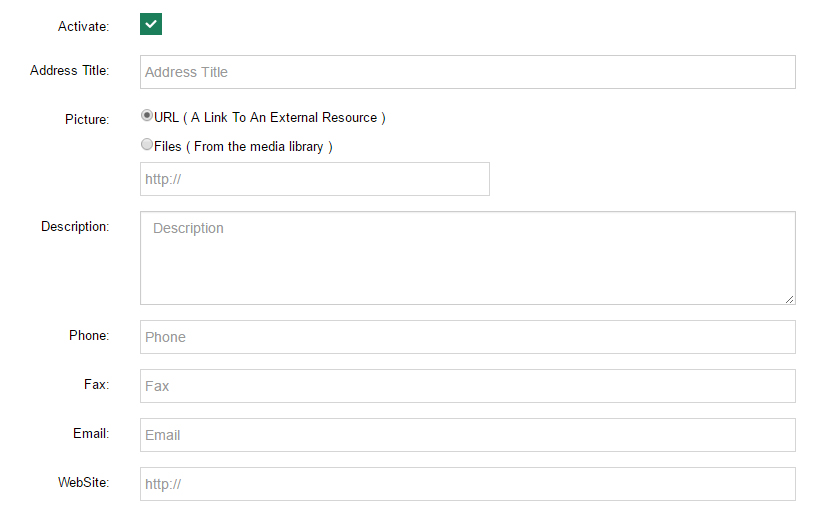
In interface order:
| Field | Description |
|---|---|
| Activate | Checkbox, checked by default; unchecking turns the address Hidden |
| Address Title | Venue name, required; events search by this name |
| Picture | Venue image — URL (external link) or Files (from the media library, default) |
| Description | Extra notes about the venue |
| Country/State/City | Searchable country dropdown (240+ countries and regions) |
| Street | Street address, required |
| PostalCode | Postal code |
| Phone / Fax | Contact numbers |
| Contact email | |
| WebSite | Related website |
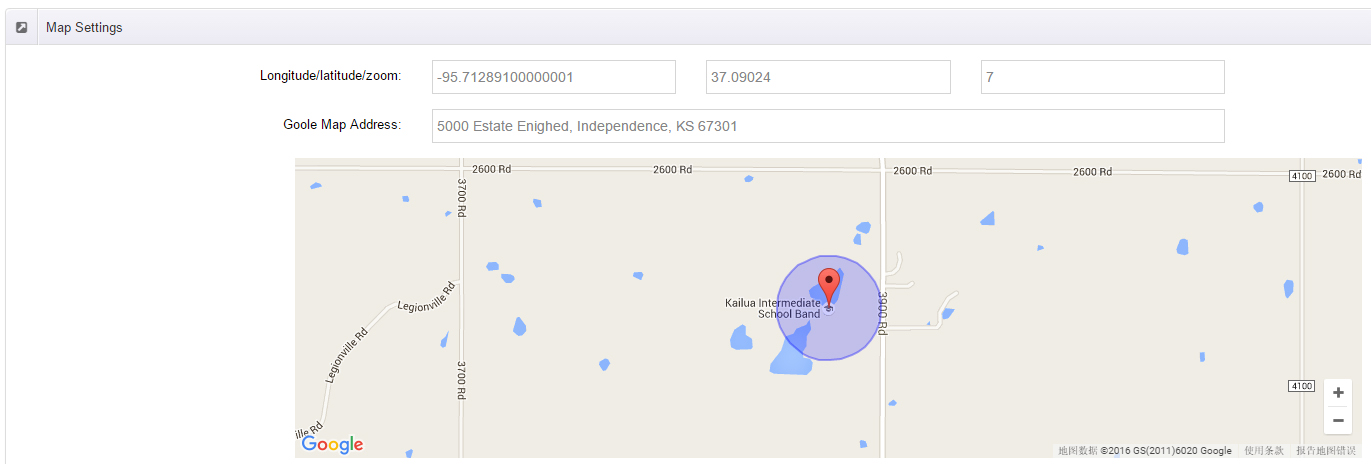
Map Settings
| Field | Description |
|---|---|
| Longitude/latitude/zoom | Three inputs — Longitude, Latitude and map Zoom level, all required |
| Google Map Address | Required. Type an address or coordinates, or drag the marker on the map below to generate them automatically |
| Marker Icon | Map marker image — URL (external link) or Files (media library) |
| Marker Text | Tooltip shown when hovering the marker, up to 500 characters |
API Key
The map requires a Google Map API Key in the General Settings. Register one on the Google Maps platform.
Using Addresses in Events
In the Location Settings of Add New Event, pick an active address from the dropdown (displayed as "Name: Full address"); an embedded Google map preview appears below the panel.