Registration Overview
xEvent allows both registered DNN users and anonymous users to sign up for events.
Front-end Registration
Users register directly on the event detail page:
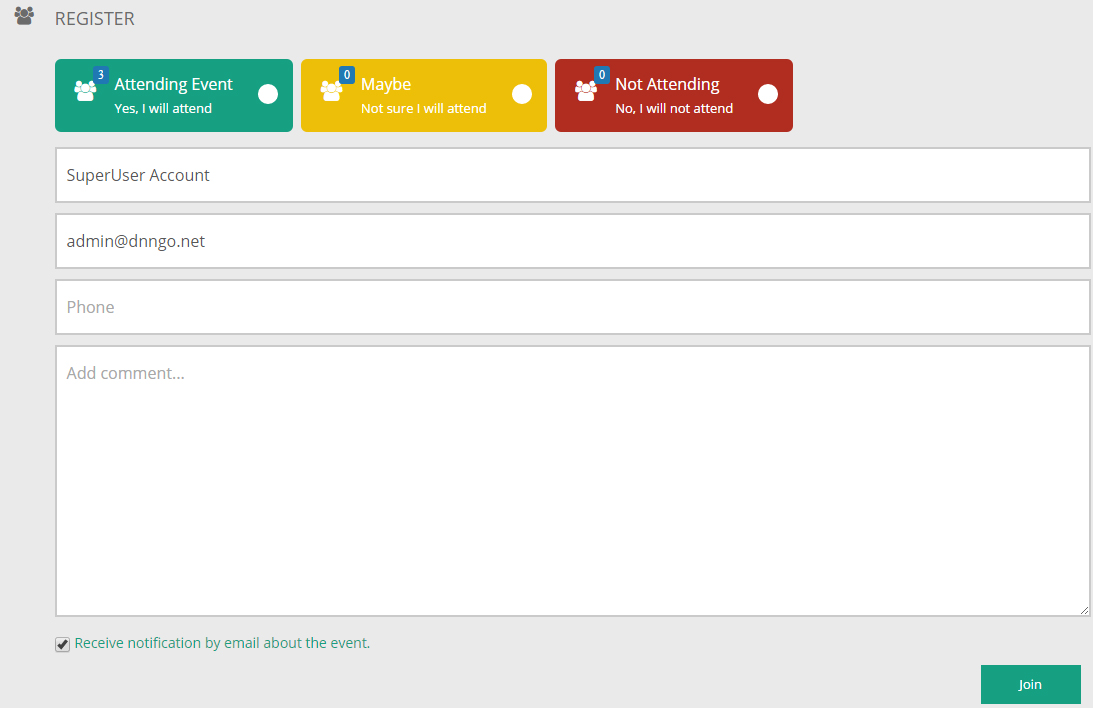
The registration form includes:
- Registration details such as name, email, phone and comments.
- Attending: when Enable Join Option is on, users can indicate whether they will attend.
- Logged-in users get their account details pre-filled; anonymous users can register directly when Need to Login is off.
Seat limits
If the event defines Number of registrations (a seat limit), the front end shows "The number of registered people has reached the upper limit." and stops accepting registrations once it is full.
Email Reminders
After a user registers, both the admin (event author) and the user receive reminder emails:
- The admin receives a new registration notification (Admin E-mail).
- The user receives a registration confirmation (User E-mail).
- When the event is about to start or has started, registered users receive scheduled reminders.
Templates can be customized under Notifications.
Admin Side
Administrators can view the registration details of every event in the admin area, export the list and email registrants — see Register List.