Slide Animation
Slide Animations are applied to the slide's main background image (or video poster/cover) when the slide appears into view.
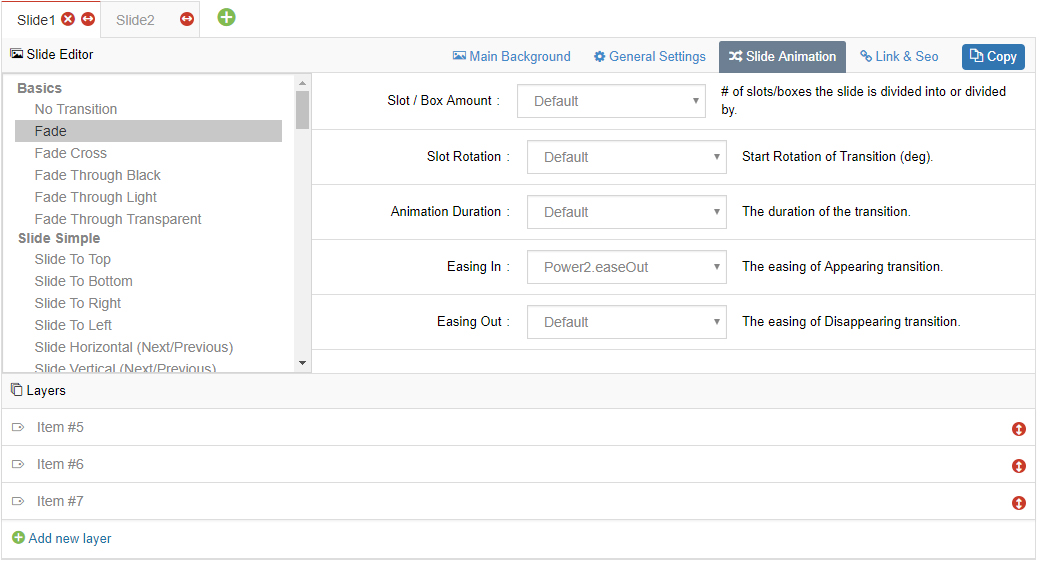
Transition
The appearance transition of the slide. Available values include papercut, flyin, turnoff, cube, 3dcurtain-vertical, 3dcurtain-horizontal, premium-random, boxslide, boxfade, slotzoom-horizontal, slotzoom-vertical, slotslide-horizontal, slotslide-vertical, slotfade-horizontal, slotfade-vertical, curtain-1, curtain-2, curtain-3, slideleft, slideright, slideup, slidedown, slidehorizontal, slidevertical, fade and random.
You can define more than one, so in each loop the next slide transition type will be shown.
Slot / Box Amount
Represents the number of "pieces" the image is divided into for these animations. If you use boxfade, over 7 slots can be jerky.
Slot Rotation
Applies a starting rotation to the slot-based animation.
Animation Duration
How long the animation will last from start to finish in milliseconds (1000 = 1 second). The default value is 300 (0.3 sec).
Easing In / Easing Out
- Easing In: The easing applied when the background animates into view.
- Easing Out: The easing applied when the background animates out of view (on slide change).
Next Steps
- Slide Layers — animate layers with entrance and loop animations
- General Settings — adjust the slide delay