General Settings
A slide's General Settings control the behavior of that individual slide, such as delay, state, schedule and thumbnail.
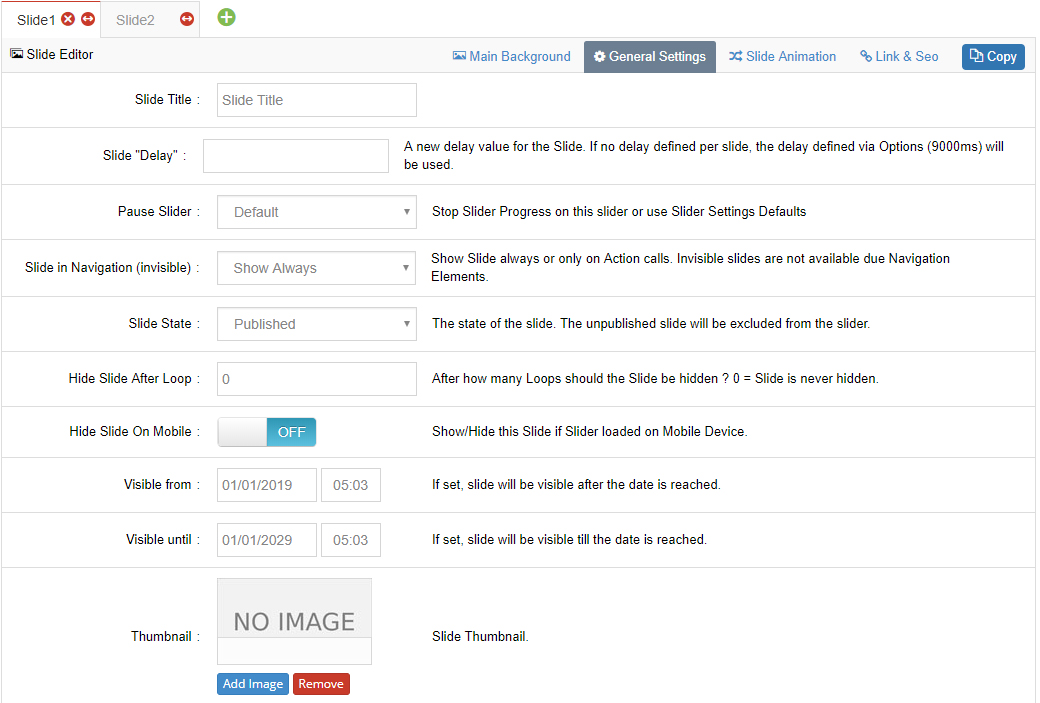
Slide Delay
Override the default slide duration for this one individual slide (see global defaults).
Pause Slider
Choose to pause the slider's progress when the slide is reached.
Slide in Navigation (invisible)
This option allows for "wildcard" slides — essentially slides that wouldn't be in the slider's normal rotation, but remain reachable via navigation or links.
Slide State
The state of the slide. The unpublished slide will be excluded from the slider.
Hide Slide After Loop
Choose if the slide should be hidden after a certain amount of loops. For example, the slide could be shown initially, and then once the slider has looped through all the slides, the slide could be hidden on the second time around.
Hide Slide On Mobile / Tablet / Notebook / Desktop
Choose separately if the slide should be hidden on mobile, tablet, notebook or desktop devices. This option could be used to "minify" your sliders on smaller devices (where 5 slides is probably a more effective presentation than 10, etc.).
Visible From / Visible Until
Normally the slide will always be visible by default. But you can choose specific dates to enable/disable the slide:
- Visible From: the slide is hidden before this date
- Visible Until: the slide is hidden after this date
Typical scenario
For time-sensitive content such as promotional banners and event announcements, set an expiry date to unpublish automatically — no manual action needed.
Thumbnail
Set a thumbnail for the slide. It is displayed in the Tabs / Thumbs navigation depending on your navigation settings.
Next Steps
- Slide Animation — configure background transitions
- Link & SEO — set links for the slide