Email Templates
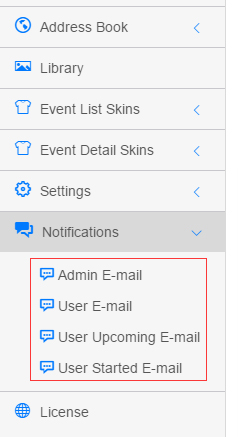
The six template pages under the Notifications menu (Admin E-mail, User E-mail and so on) share the same editor — this page uses Admin E-mail as the example.
Template Reference
| Menu | Template Name (as shown in the UI) |
|---|---|
| Admin E-mail | Admin.Notification / Reminder on event registration(Admin) |
| User E-mail | User.Notification.Registered / Reminder on event registration(User) |
| User Upcoming E-mail | User.Notification.Upcoming / Reminder on event is about to start |
| User Started E-mail | User.Notification.Started / Reminder on event has started |
| Review E-mail | Review.Notification.Admin / Reminder on event is pending approval(Admin) |
| Review Completed E-mail | Review.Notification.Author / Reminder on event has been approved(Author) |
Editor Interface
Basic Settings
| Field | Description |
|---|---|
| Template Name | Read-only template identifier and purpose, e.g. Admin.Notification / Reminder on event registration(Admin) |
| Language | Template language (read-only), e.g. en-US |
| Enable | Turn the template on or off |
| Time Before Starting | (Scheduled reminder templates only, e.g. User Upcoming E-mail) hours before the event starts when users receive the reminder |
| Mail To | Recipient, required, up to 200 characters, supports tokens such as [AUTHOR_MAIL] and [REGISTER_MAIL] |
| Mail CC | Carbon copy, up to 200 characters, supports tokens |
Email Content Template
| Field | Description |
|---|---|
| Mail Subject | Email subject, required, up to 200 characters, supports tokens |
| Mail Body | Email body — rich text editor (CKEditor) supporting HTML and tokens |
A Template Token reference list with official descriptions sits below the editor.
Available Tokens (31, with official descriptions)
Registrant Information
| Token | Description |
|---|---|
[USER_NAME] | Username of the registrant (available only after login) |
[USER_DISPLAYNAME] | Display name of the registrant (available only after login) |
[REGISTER_NAME] | Name entered during registration |
[REGISTER_MAIL] | Email entered during registration |
[REGISTER_PHONE] | Phone entered during registration |
[REGISTER_COMMENTS] | Comments entered during registration |
[REGISTER_TIME] | Registration time |
Author Information
| Token | Description |
|---|---|
[AUTHOR_USERNAME] | Username of the event author |
[AUTHOR_DISPLAYNAME] | Display name of the event author |
[AUTHOR_MAIL] | Email of the event author |
Event Information
| Token | Description |
|---|---|
[TITLE] | Event title |
[SUMMARY] | Event summary |
[CONTENTTEXT] | Event body |
[TAGS] | Event tags |
[COLOR] | Event title color |
[CATEGORIES] | Event categories (comma separated) |
[VIEWCOUNT] | View count |
[CREATEDATE] / [CREATETIME] | Created date / time |
[PICTURE] | Image URL |
[EVENTURL] | Event detail page URL |
[EDITEVENTURL] | Event edit page URL |
[STARTDATE] / [STARTTIME] | Start date / time |
[ENDDATE] / [ENDTIME] | End date / time |
Venue Information
| Token | Description |
|---|---|
[ADDRESSTITLE] | Venue name |
[ADDRESS] | Full venue address |
System & Scheduling
| Token | Description |
|---|---|
[MAILSETTING_TIME] | Hours ahead of the event start when scheduled emails are sent |
[DATETIME_NOW] | Current system time at send |
[TIME_ZONE] | Current time zone |
Template Example
A registration confirmation email:
html
<h1>Thank you for registering!</h1>
<p>We would like to remind you that you have registered for the following event:</p>

<h2>WHAT?</h2>
<p>[TITLE]<br>
<strong>Click for details</strong>: <a href="[EVENTURL]" target="_blank">here</a></p>

<h2>WHEN?</h2>
<p><strong>Start Time</strong>: [STARTTIME]</p>
<p><strong>End Time</strong>: [ENDTIME]</p>
<p><strong>Time Zone</strong>: [TIME_ZONE]</p>

<h2>WHERE?</h2>
<p>[ADDRESS]</p>
TIP
Tokens also work in the Mail Subject, e.g. Notification: [TITLE] is upcoming.