Feature Overview
All visual settings of the 20073 skin are managed through the ThemePlugin — after installation a ThemePlugin button appears in the top bar of your site; click it to open the settings page. This chapter walks through each feature.
| Feature | Description | Chapter |
|---|---|---|
| Page templates | Exported templates for every demo page (85 in total) — recreate the demo with one click | Import Page Templates |
| Header layouts | 10 header layouts, each supporting Full / Boxed / BG-Boxed width modes | Header Layouts |
| Page layouts | Full / Boxed layouts, skin width, pane layouts and sidebars | Pane Layouts & Sidebar |
| Page Title | 10 page title layouts with custom background images | Page Title Layouts |
| Page background | Static image, image slideshow or solid color — per page if you like | Page Background |
| Loading style | Page loading animation with several built-in effects, can be turned off | Loading & Content Style |
| Content style | Text color and size, link color, H1–H6 colors of the content area | Loading & Content Style |
| Logo | Separate desktop / fixed-menu / mobile logos | Logo Settings |
| Fonts | Add Google Fonts online or upload custom TTF fonts | Adding Fonts |
| Menus | Standard Menu and MegaMenu, with modules inside MegaMenu | Menus |
| Menu icons | A Font Awesome icon for every menu item | Menu Icons |
| One Page | 5 one-page home versions with anchorTag scrolling | One Page |
| Coming Soon | A coming soon page with color, end time and background options | Coming Soon Page |
| Create a skin | Create your own copy of the skin in ThemePlugin | Create a Skin |
| Google Map | Generate a contact page map by entering an address | Google Map |
| CSS structure | Bootstrap grid, the dnn_layout wrapper and spacing utilities | CSS Grid & Utilities |
Unlimited colors
True to its name, UnlimitedColorsPack exposes a color setting for nearly every element (header, menu, page title, buttons, content area…), so you can mix any color scheme without touching code.
41 home page demos
The skin ships with 41 distinct home versions (Home Version 1 ~ 41; versions 11, 19, 21, 24 and 34 are One Page layouts) plus a Coming Soon page, all importable via page templates. Each home version loads its own CSS file — HomePage01 loads HomePage01.css, HomePage02 loads HomePage02.css, and so on — so they never interfere with each other. The accompanying HTML code is in the Home Codes chapter.
Global vs single-skin settings
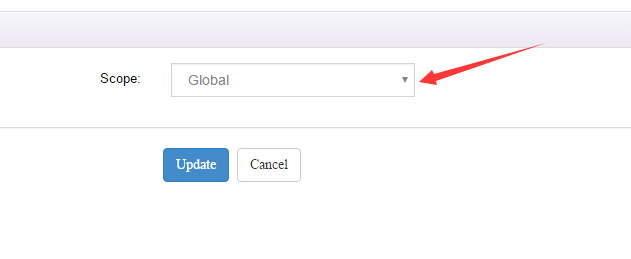
By default, a ThemePlugin setting only applies to the current skin. To apply your settings to all skins (for example, after creating several skin copies), set Scope to Global in Skin Settings.