All Events
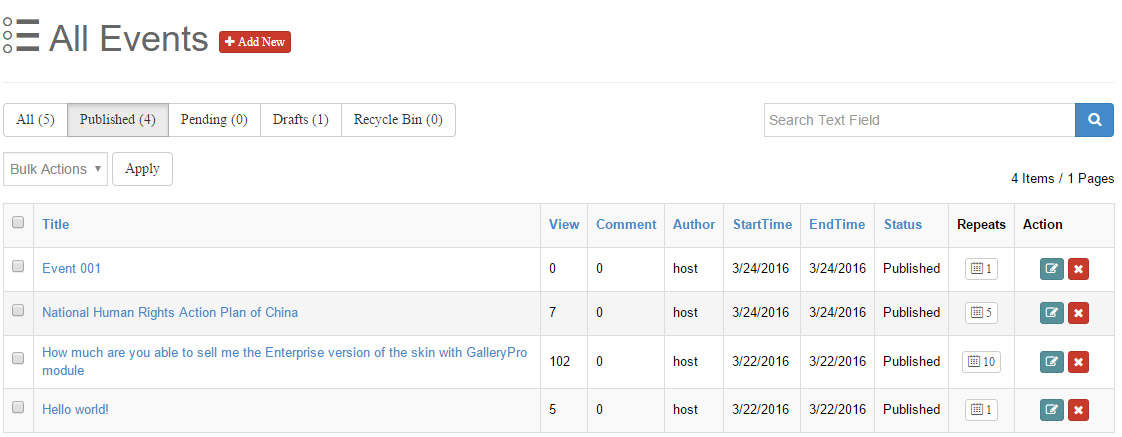
The All Events page is the central place to manage every event in the module: filtering, searching, sorting, bulk actions, editing and deletion.
Add New
The Add New button next to the page title opens the Add New Event editor.
Status Filter
Five status tabs above the list show live counts per status:
| Tab | Description |
|---|---|
| All | All events |
| Published | Live and visible on the front end |
| Pending | Submitted by authors, awaiting admin review |
| Drafts | Drafts |
| Recycle Bin | Events moved to the recycle bin |
Click a tab to filter the list by that status.
Search
The search box (Search Text Field) on the right searches by event title; click the magnifier button to run the search. Voice input is supported in Chrome and other browsers.
Bulk Actions
Check events (the header checkbox toggles all), pick an action in the Bulk Actions dropdown and click Apply:
| Action | Description |
|---|---|
| Published | Bulk publish (also restores drafts/pending/recycled events) |
| Pending | Bulk set to pending review |
| Delete | Move to the recycle bin; on recycle-bin events this deletes permanently |
A confirmation dialog appears before executing; selecting nothing prompts you to pick at least one row.
Permanent deletion
Permanent deletion also clears all related data (occurrences, registrations) and cannot be undone. Proceed with care.
Event List
| Column | Description |
|---|---|
| Checkbox | Select events; header checkbox selects all/none |
| Title | Event title; click to preview the detail page in a new window; sortable |
| View | Front-end view count; sortable |
| Comment | Comment count; sortable |
| Author | Event author; sortable |
| StartTime / EndTime | Start / end time; sortable |
| Status | Publish status (Published / Pending / Drafts); sortable |
| Registers | Registration count; click to open the Register List of the event |
| Repeats | Occurrence count; click to view all occurrences generated by the recurrence rule in a modal |
| Action | Row actions: Edit, Remove (move to recycle bin) |
- On small screens the Action column collapses into a gear dropdown menu (Edit / Remove).
- Click a column header to sort by that column.
Delete & Recycle Bin
After confirming the Remove button at the end of a row, the event is moved to the Recycle Bin and disappears from the front end immediately.
Switch to the Recycle Bin tab to see recycled events:
- Use the bulk action Published to restore them.
- Run Delete (or Remove) again to delete permanently, clearing all related data.
Pagination
Numbered pagination (with forward and jump-to-last buttons) sits below the list; the right side shows the current status statistics (e.g. "52 Items / 6 Pages"). The page size is controlled by Manager per page in the General Settings.
Repeats Modal
Clicking the Repeats button opens a modal listing every occurrence generated by the event's recurrence rule — handy for verifying the rule. See Recurring Events for rule configuration.