Recurring Events
Recurring events are one of the core capabilities of xEvent. After a recurrence rule is set, the module automatically generates the occurrence records — no manual copying required.
Basic Rules
Configure in the Time & Date → Repeat area of the event editor:
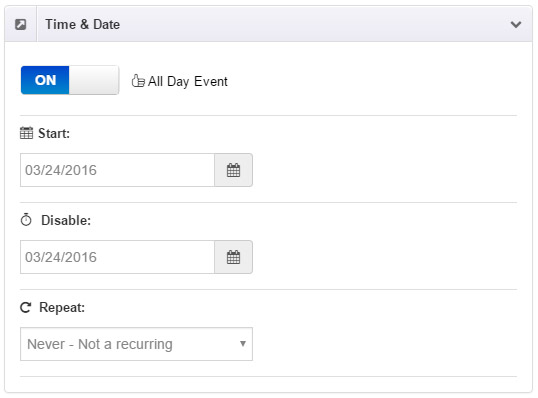
- Never - Not a recurring (default): a plain single event.
- Every day: repeats every day.
- Every week: repeats every week.
- Every 2 weeks: repeats every two weeks.
- Every month: repeats every month.
- Every year: repeats every year.
- More options: advanced rules.
End Repeat
The recurrence can end in two ways:
- By date: set a cutoff date for the recurrence.
- By count: set the maximum number of occurrences.
More Options
Use More Options to define more complex rules:
- Weekly repeat: pick specific weekdays and effective months (e.g. March, June, September only).
- Monthly repeat: set "the Nth weekday of the month" (e.g. the second Saturday).
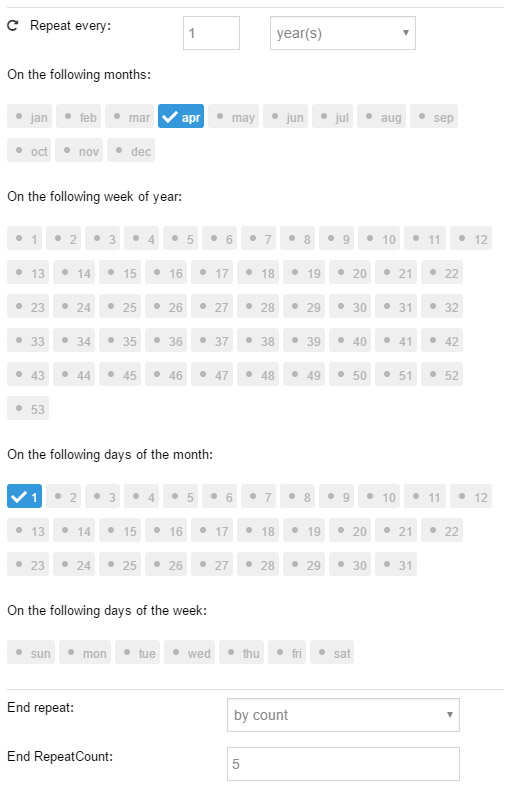
For example, repeat on April 1st every year:
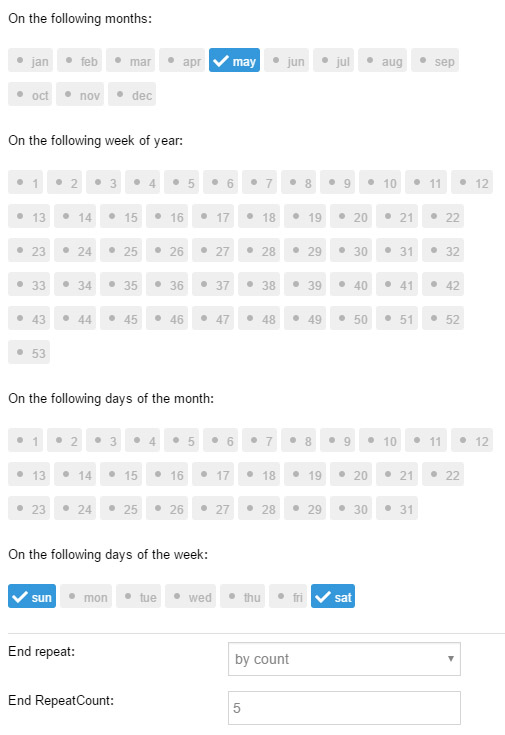
Repeat on every weekend of May:
TIP
If no parameters are set in More Options, the module automatically uses the "day" and "weekday" of the start date as default values.
Additional Dates
Use the Additional Dates button in the event editor to append extra occurrences beyond the recurrence rule — for example an extra session of a weekly meeting, without touching the rule itself.
Excluded Dates
Use the Excluded Dates button to exclude occurrences from the recurrence rule — for example skipping a holiday, simply by adding that date.
iCal Export
Every event can be exported as an iCal (.ics) file that users can import into Outlook, Google Calendar, Apple Calendar and other calendar apps. In the calendar skin this is triggered via the ICS icon.