Event Detail Skins
Event detail skins control the event detail page (the page opened by clicking an event title). Like the list skins, the Event Detail Skins menu has three parts — Skin Detail List, Options and Style — operated the same way as the Event List Skins.
Skin Detail List
Open Event Detail Skins → Skin Detail List to choose the detail-page skin. Skins appear as cards (preview image + name); currently the built-in EventDetail_01 is available:
- The skin in use shows a red stop icon in the Action column (not clickable).
- The theme button (e.g. EventDetail_01_Default) jumps straight to Options.
- Demo Url opens the official theme demo page to preview the final look.
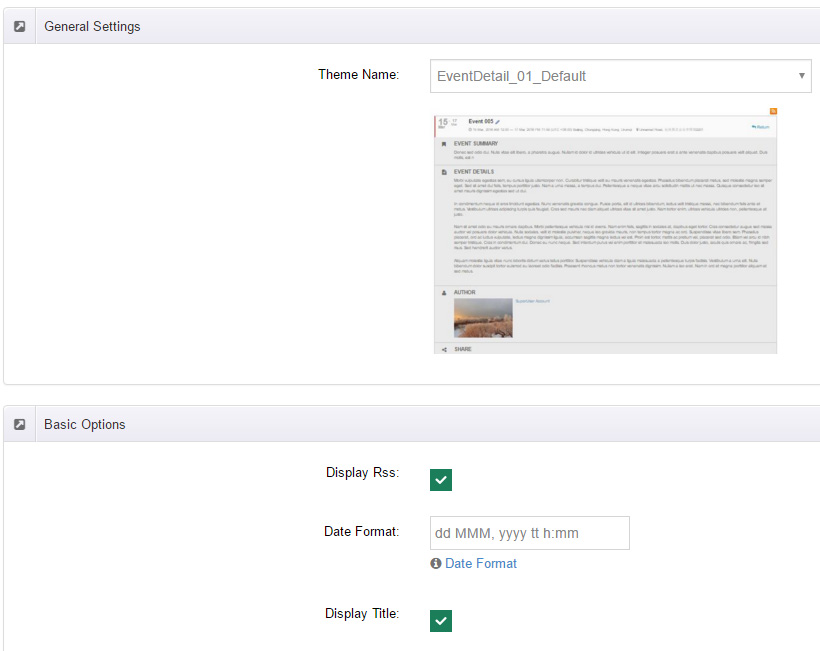
Options
General Settings
- Theme Name: pick the detail skin's color scheme (e.g. EventDetail_01_Default); a live preview appears below.
Basic Options
Formats & icons
| Option | Description |
|---|---|
| Display Rss | Show the RSS icon |
| Date Format | Date display format (the option links to the .NET custom date format reference) |
| All Day Date Format | Date format for all-day events |
Title area switches
| Option | Description |
|---|---|
| Display Title | Show the event title |
| Display Title Left Date | Show the date left of the title |
| Display Title Date | Show the date below the title |
| Display Title TimeZone | Show the timezone in the title area |
| Display Return | Show the "return" button |
| Display Title Location | Show the venue in the title area |
Content area switches
| Option | Description |
|---|---|
| Display Summary | Show the summary |
| Display Details | Show the event body |
| Display Author | Show the author |
| Display Attachments | Show attachment downloads |
| Display iCalendar | Show iCal export (add to calendar apps) |
| Display Time | Show the time |
| Display TimeZone | Show the timezone |
| Display Upcoming dates | Show upcoming occurrences (clickable) |
| Display Location / Enabled Location Link | Show the venue / make it a link |
| Display Category | Show categories |
| Display Tag | Show tags |
| Display Map | Show the Google map |
| Display Get Directions | Show the "Get Directions" button (opens Google Maps routing) |
Gallery Options
Controls the gallery slider (Gallery Image) on the detail page:
| Option | Description |
|---|---|
| Slider Width / Slider Height | Slider dimensions |
| Display Title | Show image captions |
| Thumbnail Enable | Enable thumbnail navigation |
| BulletNavigator Enable | Enable bullet navigation |
| ArrowNavigator Enable | Enable arrow navigation |
Style
Same as list skins — edit the detail skin's current theme stylesheet directly. See Skin Style.
Per-event overrides
Some items (gallery, attachments, featured image) can be overridden per event via Display Items in Add New Event; the registration area follows the event's Registration Settings.