Skin Options
The Options page provides fine-grained display control for the active skin. Open Event List Skins → Options (or Event Detail Skins → Options for the detail page).
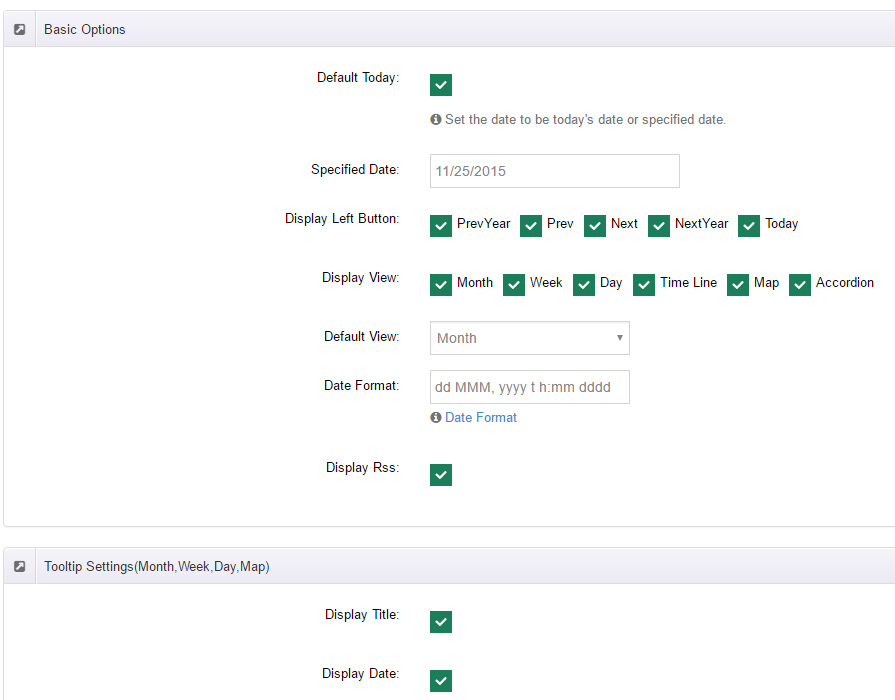
::: note Options follow the skin The option list comes with the skin template (TemplateSetting.xml), so switching skins changes the options shown. List and detail skins have separate options. Below, Skin_01_Calendar is used as the example. :::
General Settings
- Theme Name: pick the skin's color scheme; a live preview appears below.
Basic Options
| Option | Description |
|---|---|
| Sort by | Start Time ASC / Start Time DESC |
| Default Today | Position the calendar on today; otherwise use the specified date below |
| Specified Date | The initial date the calendar positions to |
| Calendar Language | Calendar UI language — 50+ locales (en, zh-cn, ja, de, fr and more) |
| Display Header Left | Show the left header area of the calendar |
| Display Left Button | Navigation buttons to show: PrevYear, Prev, Next, NextYear, Today (visible when Header Left is on) |
| Display Header Center / Right | Show the center / right header areas |
| Display View | Views available on the front end: Month / Week / Day / Time Line / Map / Accordion |
| Default View | The view loaded by default (same six) |
| Date Format / All Day Date Format / Time Format | Date and time formats — see Date Format |
| Display Rss | Show the RSS icon |
| Display ICS | Show the iCal export icon |
| Display History | Show expired events |
| Only show this month's events | Show only the current month's events |
| First Day | First day of each week — Default (follows locale) / Sunday / Monday / Tuesday |
| Event Limit | Max events shown per day cell; excess collapses into a "more" link |
Tooltip Settings (Month, Week, Day)
Configure the popup shown when an event is clicked in month/week/day views:
- Pop-up: Link (navigate to the detail page) / Click to pop up (popup preview).
- Content switches: Title, Date (Start Date And End Date), TimeZone, Location, Category, Tag, Summary, Content, Image.
Time Line Settings
- First Screen Number (initial load count)
- Display Number (per-load count)
- Loaded Data: On Scroll / On Click
- Scroll Show Max Page (max pages)
- Button Name (load button label)
- Duration: months / weeks / days
- Content switches: Title (Start Date And End Date), Enabled Title Link, Day, Date, TimeZone, Location (Enabled Location Link), Category, Tag, Summary, Content, Attachments, Image.
Map Settings
- Button Name, Duration (months / weeks / days)
- Map Zoom, Map Scrollwheel
- Address switches: Address Title, Address Picture, Address, Time
- Content switches: Title, TimeZone, Category, Tag, Summary, Image, Content.
Accordion Settings
- First Screen Number, Display Number, Loaded Data (On Scroll / On Click), Scroll Show Max Page, Button Name, Duration (months / weeks / days)
- Title-row switches: Title (Start Date And End Date), Enabled Title Link, Title Left Date, Title Date, Title TimeZone, Title Location, Title Arrow
- Content switches: Attachments, Date, TimeZone, Location (Enabled Location Link), Category, Tag, Summary, Content, Image
- Map switches: Display Map, Map Zoom, Map Scrollwheel
- Display Register Icon