Scroll Effects
Scroll effects apply fade, blur and grayscale effects to backgrounds and layers as the slider is scrolled into and out of view.
Effect Settings
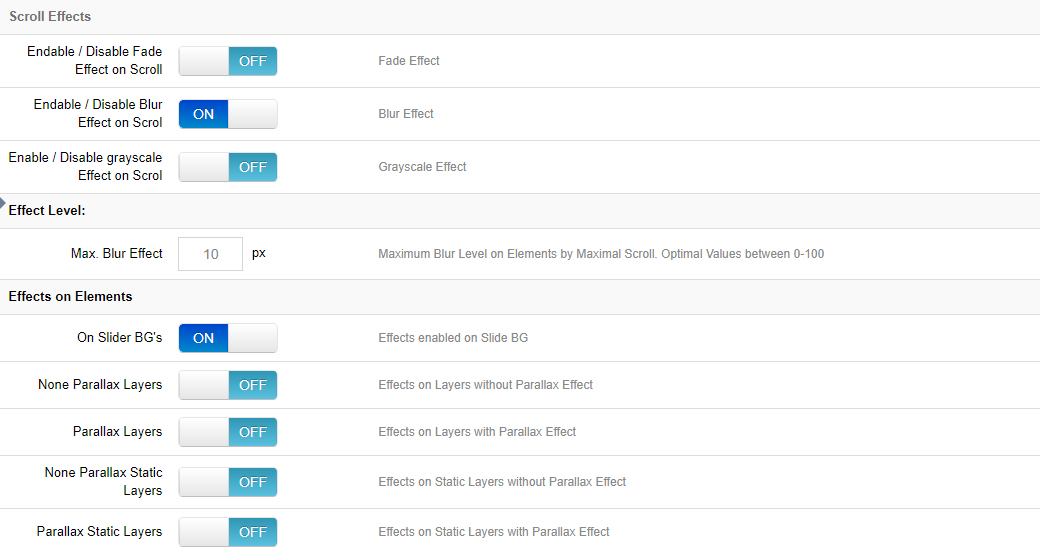
Fade / Blur / Grayscale
Choose which effects to apply to the content as the slider is scrolled into and out of view.
Effect Levels → Max Blur Effect
The blur effect's strength will never become higher than this amount.
Effects on Elements
- On Slider BG's: Apply scroll effect(s) to the slider's main background.
- None Parallax Layers: Apply scroll effect(s) to all layers that don't have parallax enabled.
- Parallax Layers: Apply scroll effect(s) to all layers that have parallax enabled.
- None Parallax Static Layers: Apply scroll effect(s) to all static layers that don't have parallax enabled.
- Parallax Static Layers: Apply scroll effect(s) to all static layers that have parallax enabled.
Scroll Dependencies
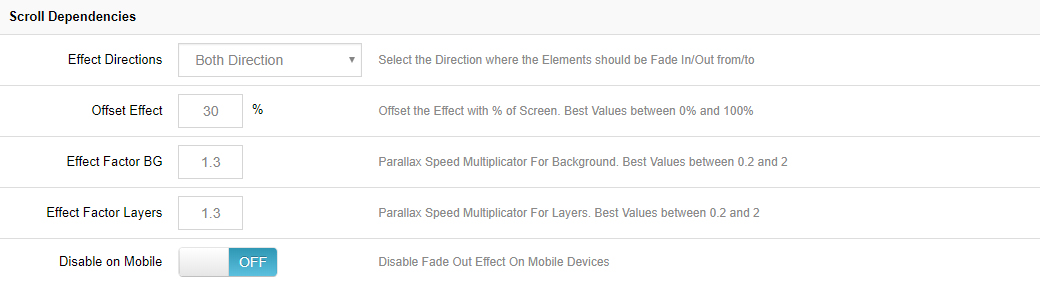
Effect Directions
- Bottom Direction = Apply the effect(s) when the page is scrolled down.
- Top Direction = Only apply the effect(s) when the page is scrolled back up.
- Both Direction = Apply the effect(s) for both "Top" and "Bottom" scrolling.
Offset Effect
The effect will be applied until this percentage of the slider is outside the page's viewport.
Effect Factor BG
The strength of the effect when applied to main backgrounds. The higher the number, the larger the variation, and vice versa. The recommended range is 0.2-2.0.
Effect Factor Layers
The strength of the effect when applied to the layers. The higher the number, the larger the variation, and vice versa. The recommended range is 0.2-2.0.
Disable on Mobile
Choose to disable scroll effects for mobile devices.
Next Steps
- Parallax & 3D — mouse and scroll driven parallax
- Problem Handlings — fallbacks for older devices