Copy From Other Module
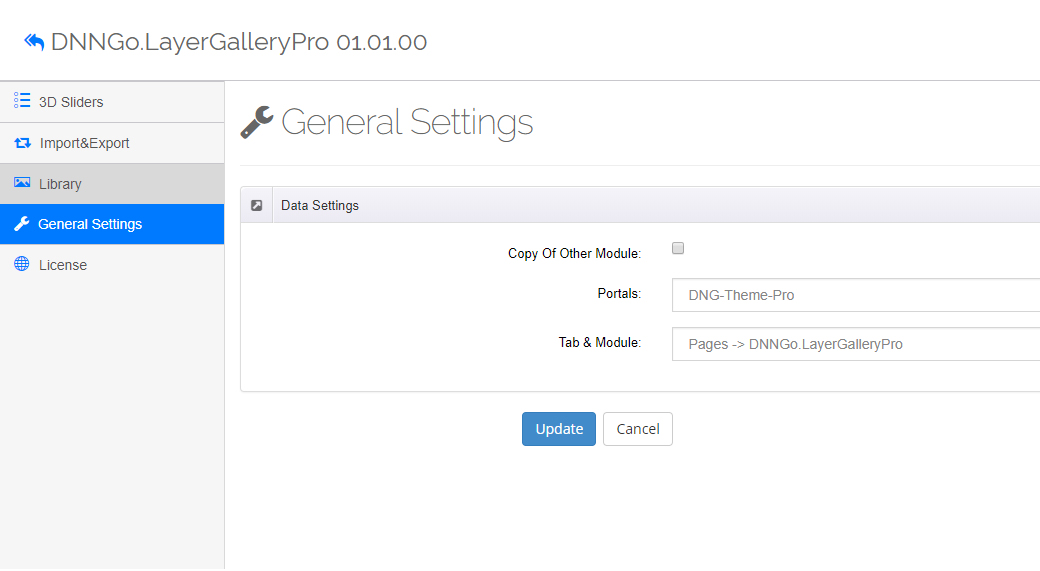
With the "Copy Of Other Module" feature you can copy the data of slider modules from other pages directly to the current module instance.
Use cases
- Same slider on multiple pages: display identical slider content on several pages without reconfiguring.
- Quick start: build one slider first, then copy it to other module instances and fine-tune.
- Bulk site building: prepare the same base slider for multiple client sites, then fine-tune each copy.
How to use
- In the module settings (Settings → General Settings), find the Copy Of Other Module section.
- Select the source module instance:
- Portals: choose the portal
- Tab & Module: choose the page and module instance
- Confirm the copy — the source module's data will be copied to the current module.
Data Settings
The Data Settings panel of the module General Settings is where this feature lives: the Copy Of Other Module checkbox plus Portals (source portal) and Tab & Module (source page and module). Besides data copying, that page also provides media library image compression and Google Fonts settings — see Module General Settings.
Difference from export/import
"Copy Of Other Module" works inside the site in one step; Export & Import goes through an XML file and is suitable for cross-site backup and migration.
Next Steps
- Module General Settings — Data Settings, compression and Google Fonts
- Export & Import — migrate data across sites