DatePicker
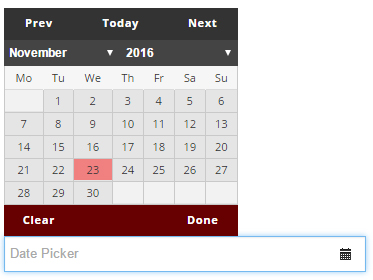
DatePicker provides a calendar-style date control: clicking the input opens a calendar, and clicking a date selects it — avoiding manual format errors.
Specific Settings
Width
The control width (pixels or percent).
ExcludeWeekends
When enabled, Saturdays and Sundays are disabled in the calendar so users can only pick weekdays. Ideal for appointments and scheduling that operate on business days. Available since version 11.0.
Required
When checked, a date must be selected before submitting.
Date Format
The date format shown in records and emails is controlled globally by Date Pattern in the General settings.
Multi-language Support
Since PowerForms 06.00.00, the date control is multi-language: the calendar displays month and weekday names according to the site/user language.
TIP
To collect a time (hour/minute), use TextBox fields with validation, or a DateTime date pattern.
Next Steps
- General Settings — Date Pattern
- Field Types Overview