ListBox
ListBox displays options in a list box where users can select multiple options by holding Ctrl (Command on Mac).
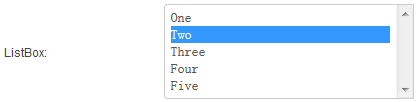
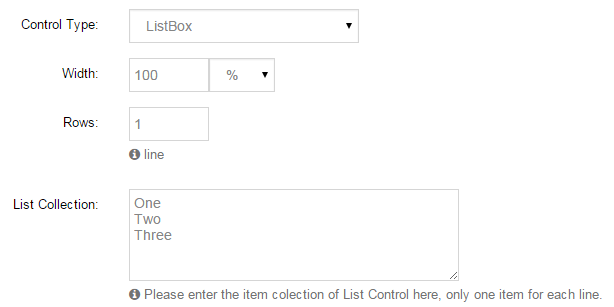
Specific Settings
List Collection
One option per line:
HTML
CSS
JavaScript
Photoshop
Illustrator
Default Value
One or more pre-selected options. Separate multiple values with commas; all must exist in List Collection:
HTML,CSSWidth / Rows
- Width: the list box width.
- Rows: the list box height in rows — more rows show more options at once.
Mandatory Validation
Check Required so at least one option must be selected.
ListBox vs CheckBoxList
| Aspect | ListBox | CheckBoxList |
|---|---|---|
| Presentation | Native list box | Group of checkboxes |
| Multi-select | Hold Ctrl — not intuitive for average users | Simply click to check |
| Footprint | Height controllable (Rows) | Grows with option count |
Recommendation
For public-facing forms, prefer CheckBoxList for a more intuitive multi-select; ListBox fits cases with many options and limited space.
Next Steps
- CheckBoxList — the common multi-select control
- Field Types Overview