
Pages
Open Pages in the Theme Plugin Pro admin area to see and manage every page in the site, including first-level pages and their children.
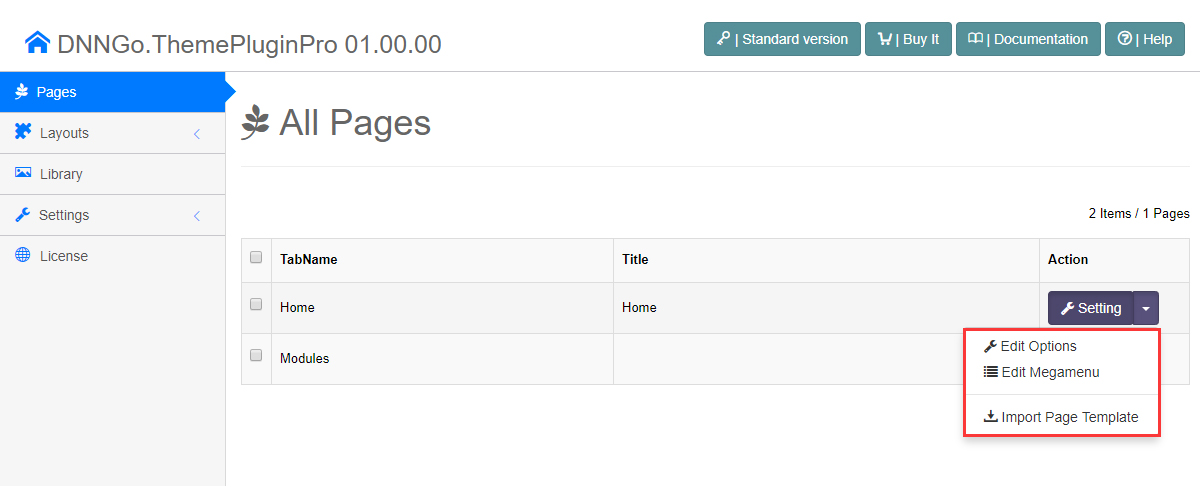
Page List
Pages are listed in a table with the following information:
| Field | Description |
|---|---|
| Page name | All pages of the site; child pages are indented to show the hierarchy |
| Actions | Per-page settings, template import, and mega menu setup |
Page Actions
The following actions are available for each page:
| Action | Description | Applies to |
|---|---|---|
| Edit Options | Opens the page's Page Options to override the global theme settings | All pages |
| Edit Megamenu | Configures the page's mega menu | First-level pages only |
| Import Page Template | Opens a dialog to import a page template onto the page | All pages |
Same setting, different entry
Edit Options here and the Page Option shortcut icon on the page open the same settings. See Edit Options.
Further Reading
- Edit Options / Page Options — full description
- Mega Menu — full description
- Import Page Templates — the complete workflow
- To set icons for menu items, see Set the Menu Icons.